Chefe 2700 · you asked to build CI/CD · 23 Aug 2026 · still pictures before the tab itself
CI = tests that run the same way every time a program changes. If they fail (red), we do not ship.
CD = ship to our lab only after green, and only if that program’s toggle is ON. Public product is a later press by you — not automatic.
You drive it from the Command tab: ASK “run tests” or “ship”, TOGGLE keep-going or pause, SEE green / red / missing.
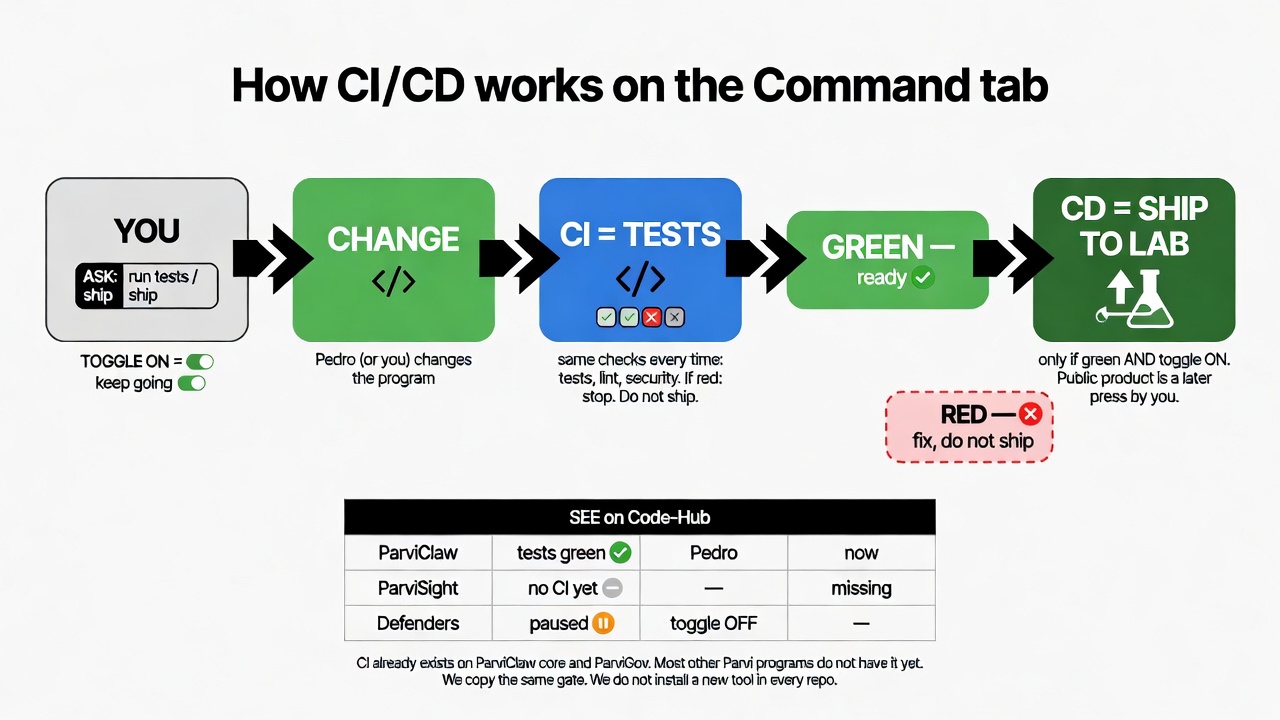
We copy the gate that already works on ParviClaw core. We do not install a new tool in every repo. We do not put Grafana in the middle.
| On the tab | What it does to CI/CD |
|---|---|
| SEE green | Last tests passed. Safe to talk about shipping to lab. |
| SEE red | Stop. Fix. Do not ship. |
| SEE missing | That program has no automatic tests yet — we copy the ParviClaw core gate. |
| TOGGLE ON | Every new change runs tests. Agents keep delivering. |
| TOGGLE OFF | Pause that program. No silent “keep shipping”. |
| ASK “run tests” | Start the same tests now, even if you did not push. |
| ASK “ship” | Only if green. Goes to our lab. Public product waits for you. |
| Program | Automatic tests today? |
|---|---|
| ParviClaw core | Yes — tests + lint + security on every push (our machine) |
| ParviGov | Yes — unit tests on every push (GitHub) |
| ParviSight, ParviMax, Defenders, Range, licensing, lab, others | Not yet — this is the copy work |
Nothing installed today. You wrote CI/DC — I treat that as CI/CD (tests, then ship). I did not add Jenkins, GitLab, or Grafana. The Command tab from 2699 is still waiting your Yes / Change; this picture is how CI/CD hangs on that tab.
Look at the picture. Then pick:
1 — Yes, this is how it works. First copy the ParviClaw test-gate onto the next program you name (I suggest ParviSight if it is on GitHub; several others are not even a GitHub repo yet).
2 — Yes to the flow, but Command tab first (2699 Yes), then the test-gate copies.
Change — tell me what is wrong (example: auto-ship public product, which I advise against).
I will not write the gates or the tab until you pick 1, 2, or Change.