Chefe 2707 · you corrected the toggle · 23 Aug 2026 · pictures before code
I had the wrong switch. You do not want “pause ParviSight / pause ParviClaw”. You want visibility after you ask Pedro or the others to do something: who picked it up, what they are doing, KPIs that matter, whether tests (CI/CD) are on, and whether ParviSight and ParviClaw were used in that work.
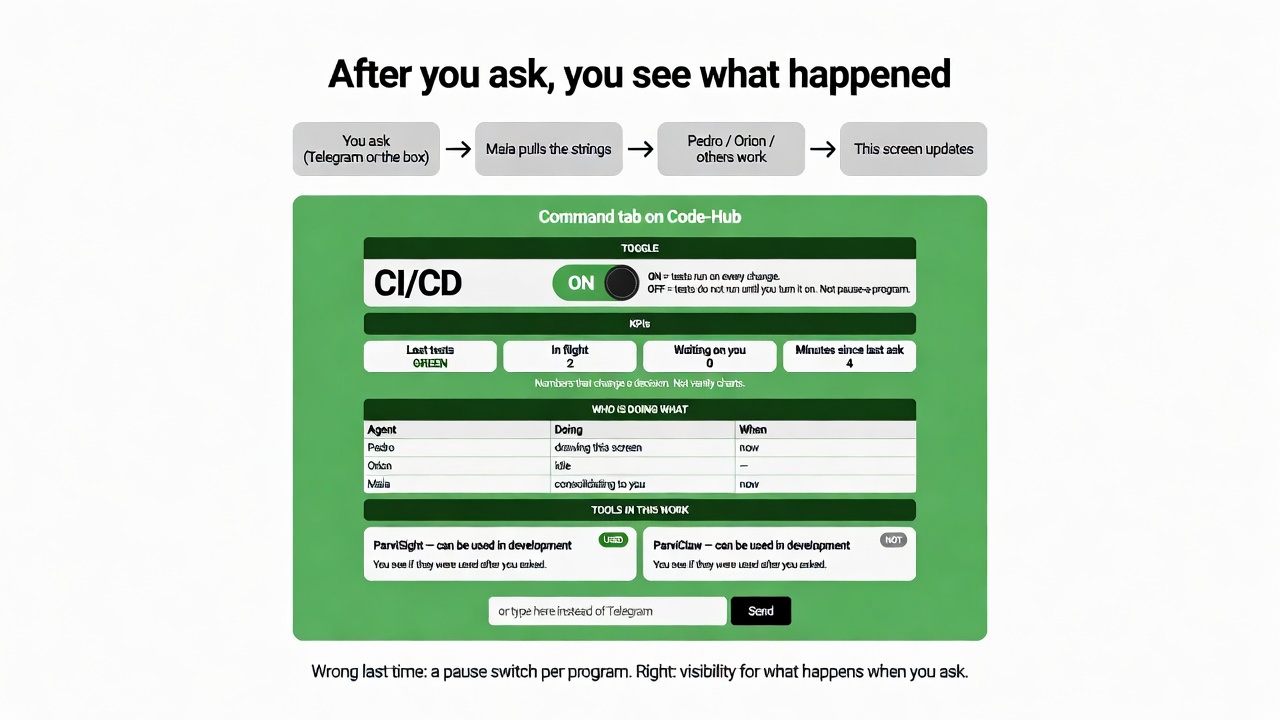
The picture in Telegram is the page. GitHub is not the viewer.
| On the screen | What you see |
|---|---|
| TOGGLE CI/CD | ON = tests run on every change. OFF = tests wait until you turn them on. One switch — not pause-a-program. |
| KPIs | Last tests green/red · how many jobs in flight · waiting on you · time since last ask. Only numbers that change a decision. |
| Who is doing what | Pedro, Orion, Maia, others: one line each — doing / idle / now. |
| ParviSight + ParviClaw | Both sit on the screen as tools that can be used in development. After you ask, you see USED or NOT — not a separate product page. |
| ASK box | Optional. Telegram still works. The point is the screen updates either way. |
| Now? | |
|---|---|
| You ask in Telegram, we work | Already works |
| Code-Hub shows some agent cards and a board | Partial — not this Command view |
| CI/CD toggle + KPIs + Sight/Claw used-or-not after an ask | Still to build |
Last picture had a pause switch per program. That was my invention. You meant: toggle CI/CD, plus KPIs, plus who is doing what, plus ParviSight and ParviClaw visible in the development work. Nothing coded yet.
Look at the picture. Only you:
Yes — this is the toggle and the visibility. Then tests, then the tab.
Change — tell me what is still wrong (example: more KPIs, more agents, Sight/Claw always on, CI/CD as two switches not one).
I will not code until you pick Yes or Change.